AI 3D Tools for Visualizing Custom Home Decor Ideas
Discover the best AI 3D tools for visualizing custom home decor ideas, helping you plan layouts, colors, and furniture before making changes.

Image-to-3D tools like Meshy can turn a reference photo, sketch, or illustration of a custom home decor piece into a shareable 3D concept model in under an hour. That covers custom vases, lamps, wall art, and furniture accessories, making concept validation, client approval, and portfolio presentation possible before any prototype gets built. One thing worth being upfront about: these are visualization assets, not manufacturing-ready files.
Why Do Custom Decor Projects Stall Before Production?
Custom decor projects stall when the client and the maker think they agree but are picturing different things.
Proportion is lost in hand sketches. Mood boards show other people's work. Building a prototype before anyone has signed off burns the budget on a guess. The gap between having an idea and having something visible to react to is where most custom decor projects slow down.
What Home Decor Items Work Well in AI 3D Generation?
Not every category translates equally well. Here's where image-to-3d reliably delivers:
Custom vases and ceramic forms: silhouette curves, proportional relationships, and surface texture all convert well
Lamp bases and pendant shades: validate visual weight and the relationship between base and shade
Wall art and relief panels: 2.5D objects with raised geometry show shadow behavior clearly
Decorative furniture accessories: drawer pulls, corbels, and shelf brackets with defined profile shapes
It falls short on tight geometric inlays with sharp edges, designs that need legible lettering, and anything where dimensional tolerances matter more than aesthetic form.
Which Items Make the Best Image-to-3D Inputs?
Single objects with one dominant surface. A tall vase at a 3/4 angle against a plain background generates stronger geometry than a multi-piece lamp photographed in a styled room. A single photo works, but 3 to 4 reference angles reconstruct the back and sides far more faithfully, since the AI rebuilds form from visual depth cues and a flat front-on photo doesn't give it enough to work with.
How Do Photos, Sketches, and Illustrations Become 3D Concepts?
Photos, sketches, and illustrations become 3D concepts through one of two input modes: image-to-3D or text-to-3D. Meshy AI supports both of them. Choosing the wrong one for the situation wastes generation cycles.
Image-to-3D takes a reference photo, product illustration, or line sketch and reconstructs the implied geometry. Input quality directly determines output quality, so use a single object, even lighting, and a 3/4 angle.
Text-to-3D is generated from a written description. It produces more variation between runs, which is useful when you're exploring directions rather than replicating a specific reference.
Does Text-to-3D Work With No Reference Image?
Yes, but vague prompts produce generic shapes. "A stoneware vase with a ribbed lower body, matte dark-green glaze, and slightly flared rim" generates a workable concept. "A nice vase" generates nothing useful. Treat the prompt like a design brief: name the material, proportions, and surface treatment.
How Does Meshy AI Move You From 2D Inspiration to 3D Concept?
Upload the reference or write the description. Meshy generates the mesh and applies PBR (physically based rendering) textures that respond to light realistically. Export as GLB, OBJ, or FBX.
GLB is the most portable format here. It bundles mesh and textures into one file. Drop it into Blender for a controlled render, into a web viewer for client sharing, or directly into a presentation. The full pipeline, from reference to shareable 3D concept, runs under an hour.
What Are These 3D Concepts Actually Good For?
There are three distinct uses, and they're each different enough to be worth separating:
Concept validation: catch proportion problems and style mismatches before fabrication starts
Portfolio building: show custom ranges you could produce on commission without building unsold inventory
Client approval workflows: get form sign-off before material costs are committed
Can You Use Meshy AI Concepts for Product Marketing Images?
Yes. Export to GLB, render in Blender with studio lighting, and you have a product image usable for Etsy listings, made-to-order pages, or pre-sale campaigns. This matters because product pages with 3D or interactive visuals have been reported to convert meaningfully better than static images alone. The render quality depends on your Blender setup, not the AI output, so the two steps stay independent.
AI 3D Visualization vs. Traditional Concepting: The Honest Tradeoffs
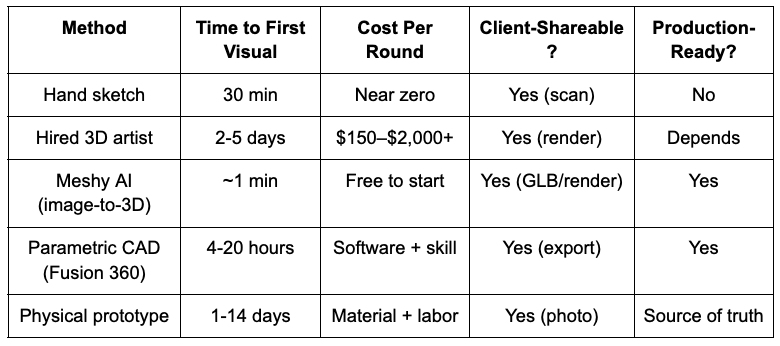
AI 3D generation is faster than every option except hand sketching, and more spatially communicative than all of them. The tradeoff is accuracy. It exports print-ready meshes for visualization and hobbyist printing, but for engineering tolerances it still sits below parametric CAD, and a physical prototype remains the final source of truth.
Key Takeaways
Meshy AI turns reference photos or text descriptions into shareable 3D concept models in under an hour, fast enough to use in live client conversations
AI-generated models are visualization and print-ready assets, not engineering files. For tight tolerances or functional parts, finish in CAD
Image-to-3D works best with single-object, 3/4-angle references. Flat front-on photos produce weaker geometry.
Conclusion
For custom vases, lamps, wall art, and furniture accessories, image-to-3D compresses the concept stage from days to hours, and that's where it earns its place in the workflow. The models export cleanly for visualization and even hobbyist 3D printing, but tight tolerances and functional parts still belong in CAD. For moving from 2D inspiration to a credible 3D concept fast enough to use in a live client conversation, few tools at this price point match what Meshy offers here .
FAQs
What is Meshy AI used for in home decor design?
Meshy AI is an AI 3D model maker that converts reference photos, sketches, or text descriptions into 3D concept models. Designers use it to visualize custom vases, lamps, wall art, and furniture accessories before fabrication, primarily for client approval and portfolio presentation.
Can I 3D print directly from a Meshy AI model?
Yes, in most cases. Meshy exports print-ready STL and 3MF, and its Refine and Printability tools automatically close holes and fix non-manifold edges before export, which is why generations reach a 97% slicer pass rate in Bambu Studio, OrcaSlicer, Cura, and PrusaSlicer. Run Printability first, and use Thicken on any walls below about 0.8 mm. For tight engineering tolerances, snap fits, or threaded parts, rebuild in CAD instead.
Image-to-3D or text-to-3D: Which should I use?
Use image-to-3D when you have a reference photo or sketch. Use text-to-3D when you're exploring concepts with no existing visual, but give specific material, proportion, and surface descriptors, or the output gets generic.
How do I share a 3D concept with a client who has no 3D software?
Export as GLB and share via Sketchfab or any browser-based viewer. The client inspects and rotates the model in their browser without installing anything.
How much does AI 3D concept visualization cost compared to hiring a 3D artist?
Generating an AI 3D concept runs on a low monthly subscription, while commissioning a single product model from a 3D artist typically costs from a few hundred to a couple of thousand dollars. That gap is why AI 3D fits the early concept stage, before budget is committed to production work.
Does Meshy AI replace a professional 3D artist?
For concept validation and early client approval, it handles most of what a 3D artist would do at that stage. For production-grade renders or manufacturing-ready geometry, you still need a specialist or a CAD tool.
Stay up to date with our latest ideas!