Best Construction Project Scheduling Software for Growing Teams
Compare the best construction project scheduling software for growing teams, with key features, pricing, scalability, and tools to keep projects on track.

Most construction teams don't lose projects because of bad crews. They lose them because the schedule falls apart and nobody catches it in time. Picking the best construction project scheduling software is one of those decisions that quietly determines whether your milestones hold or slip week after week. After reviewing the tools contractors actually use in the field, across trade coordination, real-time updates, and office-to-field alignment, this guide breaks down the five strongest options worth your attention right now.
How the picks were chosen
Each option was evaluated by pulling publicly available information from user reviews, official product pages, case studies, and software directories. Only tools with a track record in construction management made the cut, ones where scheduling, resource coordination, and field-to-office collaboration are central to how the product works.
→ See the full research breakdown
Planera - Best for construction project scheduling and CPM planning
Procore - Best for enterprise and mid-market construction management
monday.com - Best for flexible project and workflow management
Wrike - Best for enterprise project and workflow management
Autodesk Construction Cloud - Best for integrated BIM and project management
Why Construction Project Scheduling Software Is Worth the Investment
Running a construction project without the right scheduling tool is a bit like reading a map that's three months out of date. The trades have shifted, materials are delayed, and the schedule you printed on day one has nothing to do with what's actually happening on site. Interdependent subcontractor sequences mean one late delivery cascades into four other missed deadlines before anyone realizes the schedule priorities have shifted. Specialized scheduling software keeps those relationships visible and adjustable in real time. When weather hits or a supplier falls short, the right tool lets teams update the schedule and communicate the impact to everyone involved before the damage compounds. That kind of visibility directly supports a stronger Schedule Performance Index, tighter planned-versus-actual deadline tracking, and a higher Percent Plan Complete across lean construction workflows.
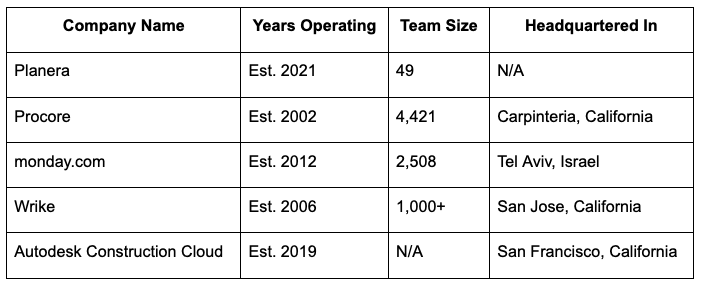
Construction Project Scheduling Software Comparison Table
Note: All data in this table is sourced from review platforms and the official websites of the listed companies.
1. Planera - Best for Construction Project Scheduling and CPM Planning
What Is the Purpose of Planera?
Planera is built for construction scheduling, and that focus shows in everything the platform does. Teams can use https://www.planera.io/ to build resource- and cost-loaded CPM schedules on a collaborative online whiteboard, which means general contractors and project managers aren't waiting on a scheduling specialist to update the plan every time something changes. The platform connects directly with Procore and Autodesk, so office and field teams are always working from the same current version.
What's Planera's Edge in Construction Project Scheduling Software?
Planera targets one of the most persistent problems in construction: the gap between how a schedule is built and how it's actually used on site. It runs on over 500 live projects for firms like Granite and Barton Malow, which suggests it's not just a clean interface but a tool that holds up under real project pressure.
The Review Roundup:
Planera has raised $26.9M in funding across three rounds, which gives it a kind of institutional credibility that's hard to fake early on. From what the reviews and client list show, teams that need CPM scheduling without the typical overhead of a dedicated scheduler find this platform genuinely practical. That kind of focused utility is rare in a market full of all-in-one platforms.
2. Procore - Best for Enterprise and Mid-Market Construction Management
What Is the Purpose of Procore?
Procore is one of the most recognized names in construction management software, and it's earned that reputation by building a platform that covers the full project lifecycle. From preconstruction through closeout, it handles project management, financials, workforce tracking, safety, and analytics in one place. The company has been around since 2002 and now serves over 2 million users across 150+ countries, meaning the product has been pressure-tested across virtually every type of construction environment you can think of.
What's Procore's Edge in Construction Project Scheduling Software?
Procore's unlimited user model removes one of the biggest adoption barriers teams face, where subcontractors and owners can be pulled into the platform without driving up the license cost. That open collaboration structure, combined with AI features through Procore Helix and Copilot, means teams can surface schedule risks and document insights faster than they could through manual tracking.
The Review Roundup:
SelectHub analysts have given Procore best-in-class marks across several categories including mobile, financials, and integrations. Honestly, the scale of the platform can feel like a lot for smaller teams, but for mid-market and enterprise contractors who need everything in one system, the depth is exactly the point.
3. monday.com - Best for Flexible Project and Workflow Management
What Is the Purpose of monday.com?
monday.com is a broad work management platform used across more than 200 industries, and construction teams have found ways to make it work for project tracking, scheduling, and resource planning. It's not built exclusively for construction the way Planera is, but its no-code customization means teams can configure workflows that match how they actually run jobs. With over 152,000 customers and recognition as a Leader in the 2025 Gartner Magic Quadrant for Adaptive Project Management, the platform carries real market weight.
What's monday.com's Edge in Construction Project Scheduling Software?
For construction teams that also need to manage procurement workflows, vendor communications, or cross-department reporting alongside scheduling, monday.com's flexibility means those processes can all live in the same system. The platform's open API and modular building blocks give it a level of configurability that purpose-built tools sometimes can't match for non-standard workflows (think owner's rep firms managing mixed portfolios).
The Review Roundup:
Teams that adopt monday.com for construction scheduling tend to get the most out of it when they invest time upfront setting up templates and automations. The 50% improvement in collaboration reported by Indosuez signals the platform delivers real results when it's configured well, not just straight out of the box.
4. Wrike - Best for Enterprise Project and Workflow Management
What Is the Purpose of Wrike?
Wrike is a project management platform serving over 20,000 companies worldwide, with strengths in Gantt chart scheduling, workload views, dependency tracking, and workflow automation. The platform uses Wrike AI to flag risks and generate predictive insights, which is useful for construction teams juggling multiple subcontractor timelines across a project. It connects with 400+ external applications, so teams already using specific tools for cost control or document management can pull those into a central workflow.
What's Wrike's Edge in Construction Project Scheduling Software?
Wrike handles the kind of layered, multi-phase project structures that show up on larger commercial and civil builds, where resource dependencies and schedule changes ripple across multiple work streams. Clients like Siemens and Estee Lauder use the platform at enterprise scale, which suggests the infrastructure holds when project scope is genuinely large, not just mid-tier complicated.
The Review Roundup:
Wrike picked up a 2024 Top Rated award from TrustRadius across 14 categories, which reflects consistent satisfaction at the user level. Where it really earns its place on this list is less about construction-specific features and more about raw workflow power for teams that need serious project management depth across large, cross-functional operations.
5. Autodesk Construction Cloud - Best for Integrated BIM and Project Management
What Is the Purpose of Autodesk Construction Cloud?
Autodesk Construction Cloud connects design, planning, construction, and operations into one platform, making it particularly strong for projects where BIM data and field execution need to stay in sync. The platform serves general contractors, specialty contractors, and owners, covering cost management, safety, document control, and project scheduling. With nearly one million subcontractors connected through BuildingConnected and over two million construction jobs run on the platform, the ecosystem around it is genuinely large.
What's Autodesk Construction Cloud's Edge in Construction Project Scheduling Software?
Few platforms can close the loop between what was designed and what's being built the way Autodesk Construction Cloud can, which matters enormously on complex commercial or infrastructure projects where design changes affect the schedule daily. The 2023 Technology Solution Award from The Inside Construction Foundation backs up what case study results like Brinkman Construction's doubled task completion speed suggest on paper.
The Review Roundup:
CCPI delivering 97.8% of projects on time and within budget is the kind of outcome that construction owners actually care about. From what the case studies and reviews show, the platform rewards teams that commit to the full ecosystem rather than using it alongside disconnected tools.
Selection Framework: How Each Pick Was Evaluated
Building a shortlist of scheduling tools that genuinely serve construction teams required a structured approach from the start. The research didn't begin with brand recognition or marketing claims. It started with sourcing.
Establishing Your Data Foundation
The process began by pulling names from construction-focused software directories, review platforms, and curated lists from project management publications. Official product websites were reviewed to understand how each product works, and case studies were collected where available. The goal at this stage was a wide starting pool, not a filtered one, so that no credible option would be missed before the narrowing began.
Filtering and Selection Criteria
From that initial pool, each tool was assessed for whether it had real, verifiable use in construction scheduling contexts. Options with thin or unverifiable reviews were set aside. Tools that appeared frequently in construction-specific project management discussions, with consistent feedback patterns across multiple review sources, moved forward. The focus stayed on platforms where scheduling, trade coordination, and field-to-office communication were either central features or well-documented use cases.
Cross-Checking Against Established Sources
Once a working shortlist existed, claims made on official product pages were compared against what users reported in reviews and case studies. Where a vendor described a capability as a main strength, that claim was checked against third-party sources to see if the field experience matched. Platforms where marketing language and what people actually experienced aligned closely were ranked more favorably than those with gaps between the two.
Industry Standing Check
Each platform was also checked for industry recognition, including awards from construction and project management bodies, mentions in reputable construction publications, and analyst recognition from firms like Gartner or SelectHub. This wasn't about prestige for its own sake. Awards and analyst recognition tend to reflect systematic evaluation against peers, which adds a layer of external validation beyond individual user reviews alone.
Real-World Construction Project Scheduling Software Evidence
The final check focused on concrete evidence of use in construction scheduling. This meant looking for dedicated scheduling feature pages, verified reviews from general contractors and project managers, and case studies with specific outcome data, whether that was on-time delivery rates, productivity gains, or measurable schedule improvements. Tools that could point to specific construction project results carried more weight than those with broad project management credibility but limited construction-specific documentation.
Choosing the Right Construction Project Scheduling Software: A Quick Guide
Picking a scheduling platform isn't just about features. It's about whether the tool fits the way your team actually works, the types of projects you run, and the integrations you already depend on. Here's what to check before committing.
Industry/Domain Experience: Look for platforms built or configured for construction workflows. CPM scheduling, trade sequencing, and field-to-office sync are non-negotiable for most project types.
Features and Service Offerings: Confirm the tool covers what you actually need day-to-day: Gantt views, resource loading, real-time updates, subcontractor task tracking, and change order management.
Pricing Structure: Understand whether pricing scales by user, by project, or by module. For larger teams, per-user models can get expensive fast (not cheap, but worth it if the tool saves you from a blown schedule).
Results Measurement: Ask vendors how teams track SPI, PPC, and deadline adherence inside the platform. If they can't answer that clearly, the reporting layer probably isn't strong enough.
Industry Knowledge and Compliance: Check whether the platform supports AGC scheduling standards, AIA contract requirements, and OSHA documentation needs. Some tools handle this well. Others leave it entirely to the team.
Wrapping Up
Getting scheduling right in construction isn't a nice-to-have. It's the difference between a project that finishes on time and one that quietly drains budget week after week. The tools on this list cover different needs, from Planera's CPM-focused whiteboard for growing contractor teams to Procore's enterprise depth and Autodesk's BIM-connected workflows. As projects get more complex and distributed, the gap between teams using purpose-built scheduling software and those piecing it together manually will only get wider.
Stay up to date with our latest ideas!